EDI Invoice Submission Errors and How to Resolve Them
EDI invoice rejections often start in your ERP and warehouse, not your software.

Most EDI 810 invoice errors start nowhere near the EDI system. When that agreement breaks down, the EDI software gets blamed for a problem it didn't cause.
Most EDI failures come from a gap between what the ERP thinks is true and what the warehouse system thinks is true. The document can proceed without failing. A bad 810 doesn't get a polite note. It gets an automatic hold, a deduction, or a flat rejection, decided by a machine in milliseconds.
What is at stake when an 810 fails
One rejected 810 rarely stays a one-invoice problem. It tends to drag cash flow, retailer trust, and margin down with it, and the total damage usually dwarfs the dollar amount printed on the invoice itself.
Disputed amounts sit frozen while someone investigates, sometimes for weeks, even as the order behind that invoice still needs to ship, get paid for, and get booked. Every Man Jack, the men's grooming brand carried by Target, Walmart, Kroger, and Amazon, watched its on-time delivery rate slide from the 96 to 97 percent range down to 80 percent while running EDI infrastructure that couldn't keep pace with what those retailers demanded. That slide didn't stay hidden. An unsent or rejected 810 is never just a paperwork headache. It's a chargeback, a delayed payment cycle, and a scorecard ding, stacked on top of each other from one failed transmission.
Eight Failure Layers and Triage Order
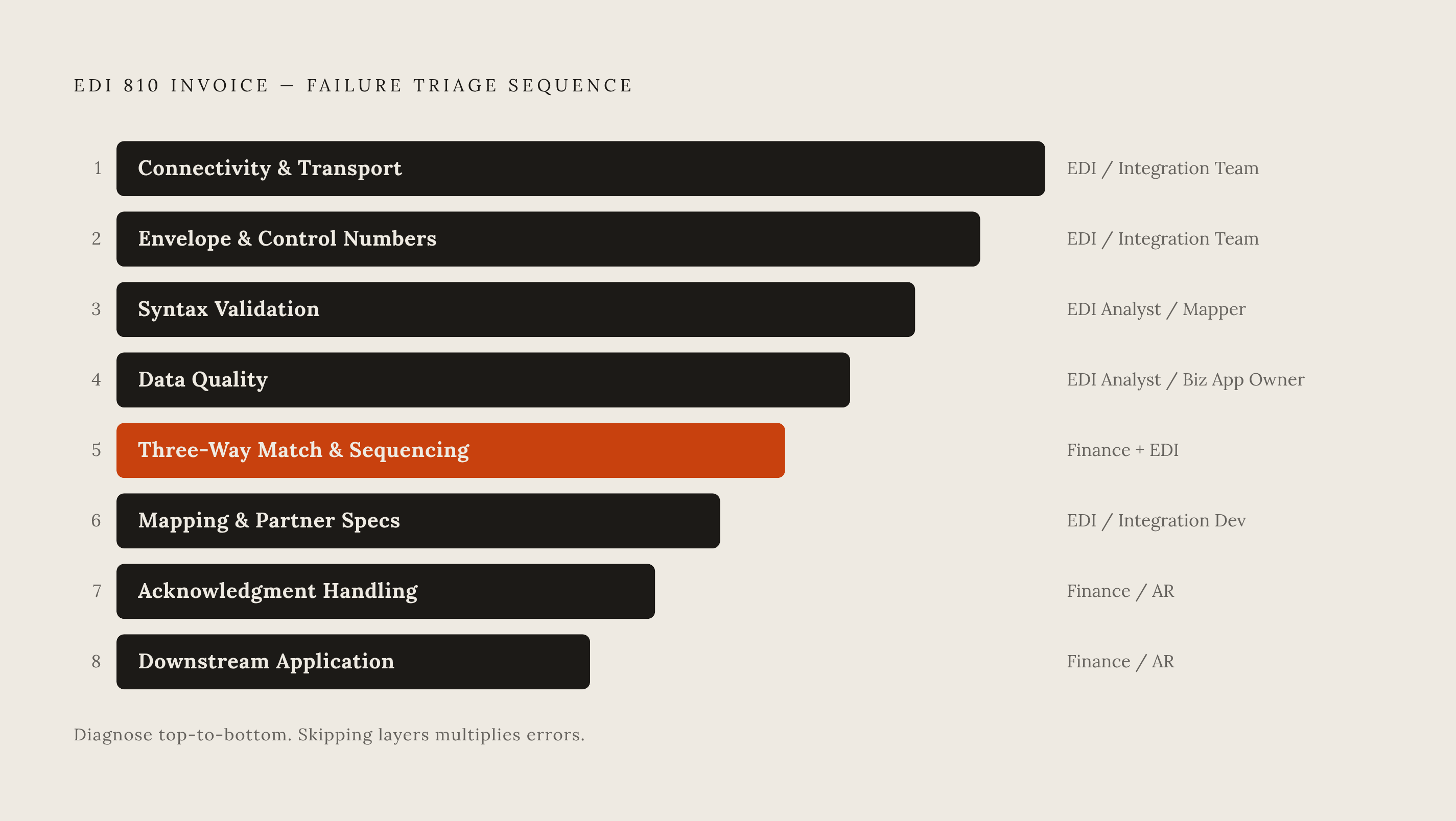
Fixing an EDI error fast means finding exactly where in the stack it broke before changing anything. EDI transactions can fail at eight different layers: connectivity and transport, envelope and control numbers, syntax validation, data quality, mapping and transformation, business-rule rejection, acknowledgment handling, and downstream application failure.
Each layer belongs to a different owner and needs a different kind of diagnosis. A fix built for layer four won't do anything for a layer two problem, and forcing it can introduce a brand-new error on top of the old one. Working the layers in order also stops duplicate work before it starts: retrying a transmission without confirming the first attempt actually failed can spin up a duplicate order or a duplicate invoice, adding a new mess on top of the original one. Before touching anything, five pieces of information need to be on hand: trading partner, transaction type, timestamp, control number, and source system. Those five data points send the problem to the right desk immediately, which is the entire point of triage.
Layers 1 and 2: Connectivity failures and envelope errors that prevent delivery before content is ever read
Connectivity and envelope failures are the two layers where what's inside the 810 doesn't matter. The document never arrives, or it arrives in a shape the partner's system won't even open.
Layer 1 covers connectivity and transport, meaning AS2, SFTP, and MFT connections. The fix is to check the endpoint, the certificates, the credentials, the protocol settings, and the transfer logs, then retry only once the original failure is confirmed. This sits with the EDI or integration team. A 3PL that can only send the EDI 945 warehouse shipping advice once a day creates a hard ceiling on ASN timing, which then limits how fast an 810 can clear downstream. Some brands have switched 3PLs for exactly this reason, after watching that single daily-batch limit generate chargebacks month after month.
Layer 2 covers envelope and control-number errors, the ISA, GS, and ST segments. An EDI analyst owns this layer. Control-number errors are also a frequent cause of accidental duplicate submissions, so checking acknowledgment status before reprocessing matters here just as much as it does at layer one.
Layer 3: Syntax errors that originate in upstream data entry, not in the EDI translator
Syntax errors make the upstream-origin argument as clearly as anything in the whole stack. The translator is doing what it was told to do. What it was told came from bad data somewhere upstream.
The symptoms are straightforward: the document doesn't meet X12 or partner-specific syntax rules, and the acknowledgment comes back pointing to a specific segment or element. The root cause is almost always bad data arriving from the ERP, the warehouse management system, the transportation management system, order management, a partner system, a marketplace, or manual entry. Manual data entry in particular tends to be where these errors sneak in. Resolving it means reading the acknowledgment closely, finding the exact segment and element flagged, checking it against the partner's implementation guide, fixing the map or the source data, and sending it again. This belongs to the EDI analyst or mapper. The real prevention step is adding data-quality checks upstream, because patching the map fixes today's invoice but leaves the source system free to generate the same error again next week.
Layer 4: Data-quality errors and the specific 810 fields that cause the most rejections
A handful of specific fields inside the 810, plus a few cross-document checks, account for most data-quality rejections. Knowing exactly which ones turns "data error" from a vague diagnosis into a two-minute fix.
The BIG segment carries the PO number, and mismatches here are common: the invoice references a PO number that doesn't match the buyer's 850 exactly, down to leading zeros, spacing, or case sensitivity. The TDS field carries the total invoice amount in implied-decimal cents, so 44400 means $444.00. And quantities on the 810 need to match the quantities on the 856 advance ship notice, or the invoice triggers a three-way match failure, which the next section covers in full.
Stale master data causes a slower, quieter version of this same problem. The fix sits in the ERP record itself, backed by pre-transmission validation that checks these specific fields before the document ever leaves the building. This is a shared responsibility between the business application owner and the EDI team.
Layer 5: The three-way match and sequencing failures that reject a correctly formatted 810
Finance teams find this layer the most frustrating, because the invoice looks completely fine. The syntax is clean, the fields are right, and it still gets rejected, because the quantities, prices, or sequence of documents around it don't line up.
Every document in the order-to-cash chain checks against the ones that came before it. The 810 has to match the 850 purchase order on items and price, and it has to match the 856 advance ship notice on quantity. Sequencing adds another trap: many retailers reject an 810 that arrives before its matching 856, so the ASN has to go out before or alongside the invoice, not after. One failed transmission anywhere in that chain can freeze the whole order cycle until someone tracks down the gap.
How the 856 got built in the first place is the root cause of most ASN-driven three-way match failures. A 3PL that generates the EDI 945 from a pick list instead of from scan-confirmed packing data at the point of shipment is working from a guess. Without scan-confirmed data, the 856 and the 810 simply won't reconcile, no matter how clean either document looks on its own.
Layer 6: Mapping and partner-specification failures caused by non-standard implementations
EDI standards are shared on paper, but every retailer builds its own version in practice. A mapping setup that works perfectly for one trading partner can quietly fail every time it's used with another.
Walmart, Target, Amazon, and Home Depot each demand different field arrangements, different segment qualifiers, and different conditional logic inside the same basic transaction set, and that variation multiplies across every transaction type a supplier sends. Fixing it means reviewing the transformation logs, the map rules, the schemas, the cross-reference tables, the partner profile, and the route configuration, then testing against known-good payloads before anything goes live again. This work belongs to the EDI or integration developer. The real fix treats every trading partner's requirements as their own set of rules, built specifically for that partner.
The 997 acknowledgment trap: why "accepted" does not mean "paid"
The EDI system shows the 810 as accepted. The AR aging report shows it still unpaid at day 45. Those two facts aren't a contradiction, and understanding why is the single most important thing a finance team can learn about EDI acknowledgments.
A 997 functional acknowledgment only confirms that a file arrived in a form the translator could read without X12 syntax errors. It says nothing about whether the invoice will actually get paid. The 997 is a receipt for the envelope, confirming it opened and the syntax inside was readable; it is not a business approval that the content passed three-way matching or made it through AP routing. Acknowledgment failures look like a 997 that never arrives, one that comes back rejected, one that comes back accepted but gets rejected later at the application layer, or a loop that simply never closes. An invoice can sit there marked "accepted" by the 997 and still get held, deducted, or quietly rejected weeks later inside the retailer's own AP system. Tracking 997 status and tracking downstream application status are two separate jobs, and treating them as one is how invoices go unpaid without anyone noticing for a month and a half. Before resending anything, check both signals. Retrying a transaction that already shows 997-accepted, without confirming what happened downstream, is how duplicate invoices get created.
Building a repeatable resolution workflow that prevents recurrence
Fixing the error in front of someone right now isn't the end of the job. Any 810 failure patched without a structural change behind it will come back, usually at the worst possible time.
The resolution lifecycle runs in five steps. Trading partner, transaction type, timestamp, control number, and source system get captured before anyone touches anything. Step three is correcting the problem at its source. Step four verifies acceptance at both layers: the 997 acknowledgment and the downstream application status must both be confirmed before marking anything resolved. The 997 alone is never the final word. Step five is closing the loop structurally, so the same failure doesn't just get fixed, it gets prevented. Without that record, nobody can tell a resolved item from an open one once volume picks up.
The organizational gap that technical fixes alone cannot close
The common assumption is that EDI invoice errors are purely a technology problem, solvable by buying a better platform. Modern EDI systems with real-time validation, automatic retries, and full visibility genuinely do help with the technical layers described above. But a lot of recurring failures have nothing to do with the technology.
The gap appears when EDI runs disconnected from anyone with actual business ownership over it. No one is watching acknowledgments. Nobody is tracking trends on the retailer scorecard. Nobody escalates when an invoice ages past the window the trading partner allows for correction. Under those conditions, errors keep coming back no matter how good the platform is. Someone still has to own the exception queue and act on it inside the correction window the trading partner allows. The 3PL limitation described earlier, where a provider can only send the EDI 945 once a day, is the clearest version of this: that's a dependency failure with a vendor, not a technical bug, and it gets solved with a vendor conversation or a vendor change, not another map update.
The gap between "transmitted" and "cash received" also lives here. Closing that gap takes ongoing, active follow-through, not a better translator. A managed AR service is built to do exactly that kind of work, functioning as an always-on AR team that keeps pushing a stuck invoice through a portal until it actually turns into cash.
A quick-reference triage checklist for finance and operations teams
Turning the eight-layer framework into something usable means giving the person staring at tomorrow's rejection a short list to run through, not another conceptual model to study. Before touching anything, write down the trading partner, the transaction type, the timestamp, the control number, and the source system, and confirm the original transmission actually failed before considering a retry. The 997 status and the downstream application status must be checked separately; treating them as one signal is how duplicate invoices get created.
From there, work the layers in order. The connectivity layer checks whether the endpoint is reachable, the certificates are current, and the file actually left the building. Layer two checks whether the ISA, GS, and ST sender and receiver IDs are correct, confirms the control number is unique, and verifies the header and trailer counts match. Layer three asks whether the acknowledgment points to a specific segment and element, and whether the error traces back to source data or to the map itself. Layer four means checking the BIG segment for PO number accuracy, the TDS field for implied-decimal cents without a stray decimal point, the N1 loop for correct party IDs, line-item alignment against the 850, and SAC codes against the partner's approved list. Layer five asks whether the 856 was transmitted and accepted before the 810 went out, whether the quantities on both documents agree, and whether the 810 fell inside the partner's transmission window. Layer six asks whether the map reflects that specific partner's current implementation guide, and whether the partner changed any requirements recently without notice. Layer seven asks whether the 997 loop actually closed, and if it did, whether a separate downstream application rejection followed anyway. Layer eight asks whether the invoice is visible and routable inside the buyer's AP or ERP system, or stuck in a supplier portal waiting on manual action.
Once resolved, log the fix: the original control number, the reason for failure, what was changed, and confirmation of final acceptance. Add a pre-transmission validation rule or an upstream data-quality check so the same failure can't repeat. And if the invoice transmitted cleanly but payment still hasn't followed inside the partner's expected window, escalate it through AR follow-up. Transmission acceptance and payment are two different outcomes, and they need two different people watching them, because a system that only tracks the first one will always be surprised by the second.

